Adding DSA North Star Icons to Your Social Media Accounts
This space will have a wide range of debate in coming weeks but for today please head over to our Statement of Principles and join if you agree.
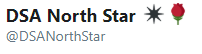
In the meantime, just a quick way to show support is to add DSA North Star icons to your twitter and Facebook profiles.
For Twitter
For adding a DSA NorthStar emoji to your Twitter handle, use a combo of the Eight Pointed Star available in twitter with a red rose. You can copy from each of these URLs directly into your twitter profile next to your name when you edit your profile:
https://emojipedia.org/eight-pointed-black-star/
https://emojipedia.org/rose/
For Facebook
Add a DSA Northstar Frame/Icon to your Facebook profile picture
- In your Facebook Feed, click on your name in the upper left to open your profile page
- Hover your mouse on your profile picture and click on it to “Update your Profile Picture”
- Click on where it says “Add Frame”
- You will see a list of frames, but in the box labelled “Search for themes, owner names and more”, search for “DSA Northstar.”
- You have the option to change back to your plain profile in an hour, a day, a week or never (meaning keep Northstar icon in your profile picture indefinitely). In the bottom right, click on the time period to keep the “Northstar” frame on your profile picture.
Comments
No comments yet.
Leave a comment
Comments are reviewed before they appear. Your name is shown with your comment.